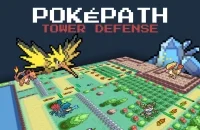
Pokepath TD (Tower Defense)
Pokepath TD (Tower Defense)
Pokepath TD (Tower Defense) - Pokémon Fan Game














Pokepath TD (Tower Defense)
Pokepath TD (Tower Defense) Introduction
Pokepath TD (Tower Defense) is a fan-made game where our friend builds a team of Pokémon and places them along enemy paths to defend against waves of creatures 🧐. Unlike regular Pokémon games, this one skips the RPG exploration and focuses purely on placement, upgrades, evolutions, and long-term team growth. The goal is simple: clear every path, survive tougher waves, and take down Legendary Pokémon waiting at the end of each route. There are 9 different routes, each rewarding different strategies—so a setup that works on one map might totally flop on another 🐾. Progress is persistent, meaning losing doesn't reset everything; Pokémon keep getting stronger, and players can switch routes freely without losing work. That’s the core loop of Pokepath TD (Tower Defense): place, upgrade, evolve, repeat. 😎.In Pokepath TD (Tower Defense), gameplay starts by picking a route and placing Pokémon at choke points, corners, or long straight sections where they get more attack time. As waves get harder, our friend must decide between adding more Pokémon, leveling up current ones, or evolving key units. Stronger enemies punish lazy placement, so raw damage alone won't cut it. Auto Mode lets the game farm resources with less input—handy for grinding—but only works if the initial setup is solid. Weak placement or poor coverage? Auto Mode won't save it 🐢. Tips? Place around corners, don't over-invest in one Pokémon early, evolve carriers when they carry defense, try unused Pokémon when stuck, and switch routes if progress slows. Export browser saves often, especially after big wins! 🔄.For longer sessions, Pokepath TD (Tower Defense) offers a desktop version (Windows, macOS, Linux) that’s more stable than the browser version. Controls are mouse/touch for selecting, placing, upgrading, and managing teams. Keyboard support is listed but hotkeys aren't clearly specified, so mouse is the way to go 😅. Why do players keep coming back? Because every failed attempt still moves them forward. They’re not just restarting—they're slowly building a stronger roster, testing new Pokémon, and learning better placements. Pokepath TD (Tower Defense) is perfect for tower defense fans who enjoy team building, idle farming, upgrades, and route-by-route progression. No hype, just solid fun 🎯.
Pokepath TD (Tower Defense) Features
Place, Upgrade, Defend with Pokémon
Pokepath TD (Tower Defense) has you place Pokémon along fixed paths, turn them into towers that fire at enemies. The twist? No RPG exploring, no catching wild Pokémon. You just build a team, drop them where the path bends, and watch them work. It's a straightforward TD game with a Pokémon skin, so if you like strategic placement and upgrade loops, this one fits.
9 Routes Force You to Adapt
There are 9 routes in Pokepath TD (Tower Defense), each one feels different. A setup that crushes one map might flop on another, so you gotta swap Pokémon and try new strategies. This keeps the game fresh, you never just stick with one team forever. Switching routes also helps when you hit a wall, just farm an easier path, then come back stronger.
Failure Doesn't Wipe Your Progress
In Pokepath TD (Tower Defense), losing a route doesn't wipe your progress. Your Pokémon keep levels, upgrades, and evolutions. So every failed run still moves you forward, no full resets. This makes the game forgiving, you can experiment with bad placements, learn, and try again without losing everything.
Auto Mode for Grinding, Not Fixing
Auto Mode in Pokepath TD (Tower Defense) lets you grind resources with less clicking. Useful for farming when you want to strengthen your team before tackling a hard route. But it only helps if your setup is already solid, it won't fix weak placement or bad coverage. So you still need to build a good foundation first.
Browser and Desktop, Save Often
Pokepath TD (Tower Defense) is playable in browser and on desktop (Windows, macOS, Linux). Browser is convenient, but desktop is more stable for long sessions. If you play in browser, export your save often from the menu, or risk losing hours of work. Controls are simple, just click or tap to select, place, upgrade, and evolve.
Pokepath TD (Tower Defense) Frequently Asked Questions
What is Pokepath TD (Tower Defense)?
Pokepath TD is a fan-made Pokémon tower defense game where players build a team, place Pokémon along enemy paths, and defend against waves across multiple routes. Instead of RPG exploration, the focus is on placement, upgrades, evolutions, and long-term team growth. The goal is to clear every path and defeat Legendary Pokémon at the end. It's a cool mix of strategy and Pokémon fun! 🎮
How do players get started in Pokepath TD?
Starting in Pokepath TD is straightforward. Players choose a route first, then place Pokémon where they can cover the path effectively. Choke points, corners, and long straight sections are usually valuable spots. As waves get tougher, players decide whether to add more Pokémon, level up, or evolve key units. Remember, lazy placement can be punished by stronger enemies! 😅
What are the routes like in Pokepath TD?
There are 9 different routes in Pokepath TD, and each one can reward different strategies. A setup that works on one route might struggle on another, so switching teams is part of the game. Progress is persistent – losing doesn't fully reset the player's work, and Pokémon keep growing stronger over time. It's all about adapting! 💪
On which platforms can Pokepath TD be played?
Pokepath TD can be played in a browser, and there's a desktop version for Windows, macOS, and Linux. For longer sessions, the desktop version is more stable. If playing in the browser, it's a good idea for players to export their save regularly from the menu to avoid losing progress. Safety first, folks! 💾
How are controls handled in Pokepath TD?
Controls in Pokepath TD are mostly mouse or touch-based. To select or place Pokémon, players use mouse clicks or taps. Upgrading and evolving is done via on-screen buttons. There's also Auto Mode accessible through the UI. Keyboard support is listed, but exact hotkeys aren't clearly specified. It's all pretty comfy with a mouse or touch! 🖱️
What does Auto Mode do in Pokepath TD?
Auto Mode lets the game keep farming with less input, which is great for grinding resources or strengthening Pokémon before tackling harder routes. But here's the catch: it won't fix weak placement or a team that can't handle enemies. Players still need to build a good setup first. So, use it wisely! 🤖
What are some tips for better defense in Pokepath TD?
Sure! Players should place Pokémon around corners and long coverage zones for more attack time. Don't over-invest in one Pokémon early – balance the team. Evolve key units when they carry the defense. Try unused Pokémon if stuck, as some maps need different roles. And if progress slows, switch routes to farm and come back stronger. Oh, and export browser saves often! 📈
Why is Pokepath TD engaging for players?
Players keep coming back to Pokepath TD because every failed attempt still moves them forward. They're not just restarting; they're building a stronger roster, testing new Pokémon, and learning better placements. It's a solid fit for those who enjoy tower defense with team building, idle farming, upgrades, and route-by-route progression. Fun and rewarding! 🚀